What is an SPF record? It is a short line of text in your domain's DNS settings that lists the mail servers allowed to send email for your domain. Receiving mail servers check that list. Mail from a server that is not on it can land in spam or be rejected, which makes it harder for scammers to fake email from your address.
The Website SEO Checkup puts SPF next to a few other site care checks: email addresses shown on your pages, links that open in a new tab, and the ads.txt file. None of them changes your rankings much, but they protect your visitors and your name.
What is an SPF record and how does it work?
SPF stands for Sender Policy Framework. DNS, the Domain Name System, is the address book of the internet. It holds records for your domain, such as where your site lives and where your email goes. An SPF record is one of those records. It is saved as a TXT record, which is a record that holds plain text.
Here is what happens when you send an email:
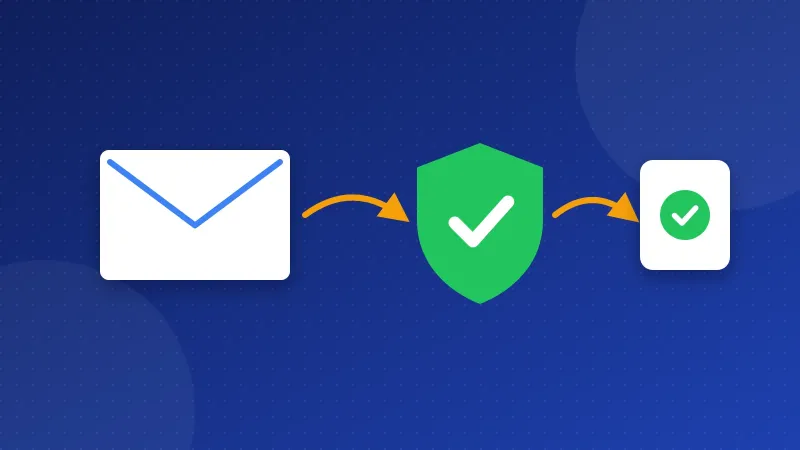
- Your mail server sends the message to, say, a Gmail inbox.
- Gmail looks up the SPF record for your domain in DNS.
- It checks whether the server that sent the message is on your list.
- If it is, the email passes. If not, Gmail treats it as suspect.
Without an SPF record, anyone can send email that claims to come from your domain, and the receiver has no list to check. That is called spoofing.
What does an SPF record look like?
An SPF record is one line. Here is a common example for a domain that uses Google Workspace for email: v=spf1 include:_spf.google.com ~all
| Part | What it means |
|---|---|
| v=spf1 | This is an SPF record. Every record must start with it. |
| include: | Also allow the servers listed by this other domain, such as your email provider. |
| ip4: | Allow one server address, such as your hosting server. |
| ~all | Soft fail: mail from other servers is accepted but marked as suspect. |
| -all | Hard fail: mail from other servers should be rejected. |
Start with ~all. Google warns that a hard fail can push more of your own mail to spam if your list misses a sender. Switch to -all only once you are sure every service that sends your mail is listed.
How do you add an SPF record?
- Find your senders. List every service that sends email as your domain: your host's mail server, Google Workspace or Microsoft 365, a newsletter tool, a contact form plugin.
- Get each include line. Each provider shows its own include value in its help pages or in your account settings. Your web host usually shows the right record in its email or DNS section.
- Open your DNS editor. In cPanel, open Zone Editor. In Cloudflare, open DNS, then Records. On other hosts, look for DNS Zone or DNS Management.
- Add one TXT record. Set the name to @ (your main domain) and paste the full line as the value, for example
v=spf1 include:_spf.google.com ~all. - Save and wait. DNS changes can take a few hours to spread.
Two rules trip up most people. First, each domain can have only one SPF record. If you use two services, merge them into one line, like v=spf1 include:_spf.google.com include:mail.example.net ~all. Second, Google says the record should not point to more than 10 other domains or servers. Each include counts toward that limit.
Does your domain never send email? Then publish v=spf1 -all. The record lists no servers, and -all tells receivers to reject the rest, so any fake mail from that domain fails.
SPF works best with two partners. DKIM adds a digital signature to each email. DMARC tells receivers what to do when SPF or DKIM checks fail. Set up SPF first, then ask your host about the other two.
If you have not linked your domain to your host yet, our guide on how to point a domain to hosting covers DNS records step by step.
Why should you hide email addresses on your pages?
Spam bots crawl the web and copy any email address they find in the page code. A plain address on your contact page will collect spam for years. The checkup flags any address it finds in the HTML.
Use a contact form instead. In the Bloghints CMS, type on any page to add one. On WordPress, a contact form plugin does the same job. If you must show an address, write it as an image or as plain words, such as "hello at example dot com".
Why add rel="noopener" to new-tab links?
A link with target="_blank" opens in a new tab. In old browsers, the new page could reach back and change your page, for example to swap it for a fake login screen. The fix is one word in the link: <a href="https://example.com" target="_blank" rel="noopener">Example</a>
MDN notes that modern browsers already treat target="_blank" links as noopener. Adding it yourself still protects visitors on old browsers and makes the checkup happy. In WordPress, the block editor adds it for you. For more free protection, see our guide on how to add HSTS and security headers.
What is ads.txt and do you need it?
Ads.txt is a small text file that lists the companies allowed to sell ads on your site. It stops others from selling fake ad space with your name on it. Google AdSense says the file is not mandatory, but it is highly recommended.
You only need it if you show ads. To add it:
- Copy the line your ad network gives you. For AdSense it looks like
google.com, pub-0000000000000000, DIRECT, f08c47fec0942fa0, with your own publisher ID. - Paste it into a plain text file named ads.txt.
- Upload it to your site's main folder, usually public_html, so it opens at yoursite.com/ads.txt.
AdSense has paid me only a few dollars a month for years, but ads.txt still takes little time and keeps the account tidy. Keep a copy with your other site files; our guide to website backup basics explains how.
So, what is an SPF record? It is your domain's one list of allowed mail senders, and it takes a few minutes to add. Fix the email, link and ads.txt checks around it too. Make the changes, wait for DNS to update, and re-run the free Website SEO Checkup to confirm each item passes.
Frequently asked questions
How do I check if my SPF record works?
Send an email from your domain to a Gmail address. Open the message, click the three dots and choose "Show original". Look for "SPF: PASS". You can also re-run the checkup, which shows the SPF record it found.
Does an SPF record help my SEO?
Not directly. Google does not rank pages by SPF. It protects your domain's email and your name, which matters for trust, newsletters and contact replies that need to reach the inbox.
What happens if I have two SPF records?
The SPF standard treats two SPF records as an error, so your SPF check can fail for every message. Merge them into one line that starts with v=spf1, holds every include you need and ends with a single ~all or -all.